
Now we need a frontend that actually consumes that stream. Not “wait for the full response and display it” — that defeats the purpose of streaming. We need the user to see words appear as the AI generates them, see which tool is executing while it runs, get file downloads the moment they’re ready, and approve or reject write operations inline.
In Part 1, we built an agentic AI backend with tool-calling capabilities.
In Part 2, we added file generation, an approval workflow for safe write operations and multimodal image handling.
Now in part 3 we’ll build three things:
- A JSON stream decoder that parses chunked responses from fetch ReadableStream
- A Vue 3 composable that wires the stream to reactive state
- A chat component that renders streaming text, tool indicators, file attachments, and approval cards
Once again, this is not a full working source. But I trust you all are using Claude, Codex, or some other tool anyway. They know how to fill the gaps.
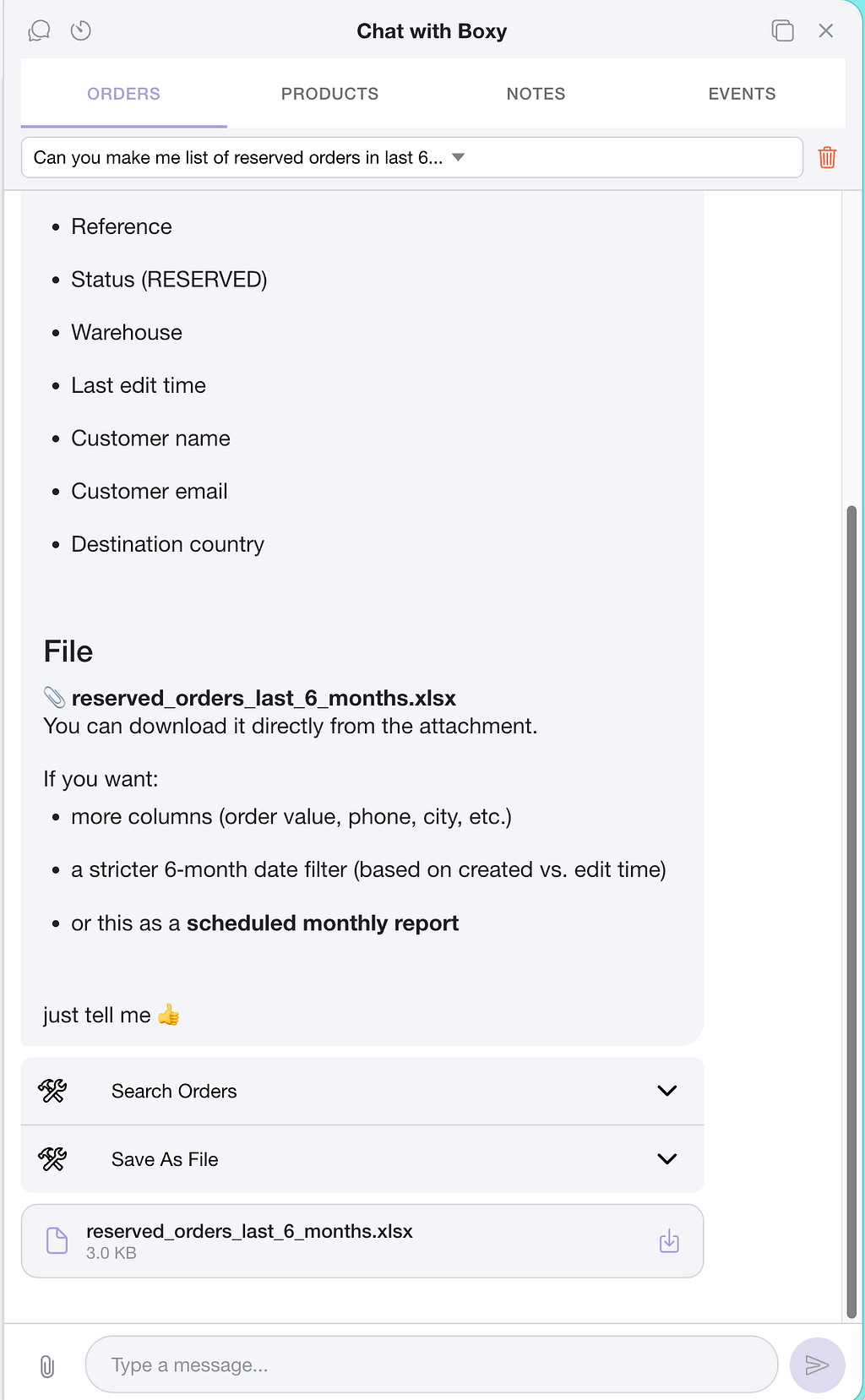
Here is one sample how UX could look like:
The Streaming Protocol
Our backend (from Parts 1–2) streams responses as newline-delimited JSON over HTTP. Each line is a self-contained JSON object representing one type of event:
{ "type": "Text", "data": "Here are your" }
{ "type": "Text", "data": " notification templates..." }
{ "type": "Tool", "data": "ListTemplates" }
{ "type": "Text", "data": "\n\nI found 12 templates." }
{ "type": "NewMessage", "data": "assistant|msg-id-123|2025-02-20T10:30:00Z" }
Three chunk types:
- Text — a fragment of the AI’s response, streamed word by word
- Tool — the name of a tool being executed (appears while the tool runs)
- NewMessage— signals the response is complete, with metadata (sender, message ID, timestamp) packed into a pipe-delimited string
The frontend can’t use response.json() because the response isn’t complete JSON — it’s a stream that arrives in pieces while the AI is still thinking. We need to parse each JSON object as soon as it arrives.
The JSON Stream Decoder
This is the most interesting piece of frontend code. “fetch” with ReadableStream gives us raw Uint8Array byte chunks. TCP doesn’t respect JSON boundaries — a chunk might contain two complete objects, half an object, or end mid-key. We need a parser that handles all of these cases.
The solution: track brace depth. When we see “{“, increment. When we see “}”, decrement. When depth returns to zero, we have a complete JSON object.
export class JsonStreamDecoder {
  private level = 0;
  private partialItem = "";
  private decoder = new TextDecoder();

  public decodeChunk<T>(
    value: Uint8Array,
    callback: (item: T) => void
  ): void {
    const chunk = this.decoder.decode(value);
    let itemStart = 0;

    for (let i = 0; i < chunk.length; i++) {
      if (chunk[i] === "{") {
        if (this.level === 0) itemStart = i;
        this.level++;
      }
      if (chunk[i] === "}") {
        this.level--;
        if (this.level === 0) {
          let item = chunk.substring(itemStart, i + 1);
          // Prepend any partial data from previous chunk
          if (this.partialItem) {
            item = this.partialItem + item;
            this.partialItem = "";
          }
          callback(JSON.parse(item));
        }
      }
    }

    // If we're mid-object when the chunk ends, buffer it
    if (this.level !== 0) {
      this.partialItem += chunk.substring(itemStart);
    }
  }
}
The partialItem buffer handles the TCP splitting problem. If a chunk ends with {“type”: “Te and the next chunk starts with `xt”, “data”: “hello”}`, the buffer joins them before parsing.
This decoder is generic — decodeChunk<T> works with any JSON shape. You pass a typed callback and get parsed objects back. It’s 43 lines of code and handles every edge case we’ve thrown at it in (limited) production.
The Streaming Composable
With the decoder in hand, we wire it to Vue’s reactivity system. The composable manages all chat state and exposes reactive refs that the component binds to:
import { ref } from "vue";
import { JsonStreamDecoder } from "@/utils/jsonStreamDecoder";

interface ChatMessage {
  id: string;
  sender: string;
  text: string;
  sentAt: Date;
  files?: FileAttachment[];
}

interface FileAttachment {
  fileId: string;
  fileName: string;
  contentType: string;
  sizeBytes: number;
}

interface StreamChunk {
  type: string;  // "Text", "Tool", "NewMessage"
  data: string;
}

interface ApprovalRequest {
  id: string;
  toolName: string;
  actionType: string;
  summary: string;
  status: "pending" | "approved" | "rejected";
}

export function useAiChat(channelId: number, conversationId: string) {
  const messages = ref<ChatMessage[]>([]);
  const streamingText = ref("");
  const activeTool = ref("");
  const isLoading = ref(false);
  const pendingApprovals = ref<ApprovalRequest[]>([]);

  async function sendMessage(text: string, authToken: string) {
    if (!text.trim() || isLoading.value) return;

    // Add user message immediately — don't wait for the server
    messages.value.push({
      id: crypto.randomUUID(),
      sender: "user",
      text,
      sentAt: new Date()
    });

    isLoading.value = true;
    streamingText.value = "";
    activeTool.value = "";

    const decoder = new JsonStreamDecoder();

    const response = await fetch(`/api/chat/${channelId}/${conversationId}/ask`, {
      method: "POST",
      headers: {
        Authorization: `Bearer ${authToken}`,
        "Content-Type": "application/json"
      },
      body: JSON.stringify({ text, conversationId })
    });

    const reader = response.body!.getReader();

    while (true) {
      const { done, value } = await reader.read();
      if (done) break;

      decoder.decodeChunk<StreamChunk>(value, (chunk) => {
        if (chunk.type === "Text") {
          streamingText.value += chunk.data;
        }

        if (chunk.type === "Tool") {
          activeTool.value = chunk.data;
        }

        if (chunk.type === "Approval") {
          const approval = JSON.parse(chunk.data) as ApprovalRequest;
          pendingApprovals.value.push(approval);
        }

        if (chunk.type === "NewMessage") {
          // Parse metadata: "assistant|msg-id|2025-02-20T10:30:00Z"
          const [sender, id, timestamp] = chunk.data.split("|");
          messages.value.push({
            id,
            sender,
            text: streamingText.value,
            sentAt: new Date(timestamp)
          });
          streamingText.value = "";
          activeTool.value = "";
        }
      });
    }

    reader.releaseLock();
    isLoading.value = false;
  }

  async function resolveApproval(
    approvalId: string, approved: boolean, authToken: string
  ) {
    await fetch(
      `/api/chat/conversations/${conversationId}/approvals/${approvalId}`,
      {
        method: "PUT",
        headers: {
          Authorization: `Bearer ${authToken}`,
          "Content-Type": "application/json"
        },
        body: JSON.stringify({
          status: approved ? "approved" : "rejected"
        })
      }
    );

    // Update local state
    const approval = pendingApprovals.value.find(a => a.id === approvalId);
    if (approval) approval.status = approved ? "approved" : "rejected";
  }

  return {
    messages, streamingText, activeTool, isLoading,
    pendingApprovals, sendMessage, resolveApproval
  };
}
Four things to notice:
The user message appears instantly. We push it to `messages` before the fetch call. The user sees their message in the chat immediately — no waiting for the server roundtrip.
Reactive refs update per chunk. Every time a Text chunk arrives, `streamingText.value += chunk.data` triggers a Vue re-render. The user sees words appear in real-time, just like ChatGPT. This works because Vue’s reactivity system batches DOM updates efficiently — even hundreds of small updates per second render smoothly.
Tool name replaces, text accumulates. When a Tool chunk arrives, activeTool gets replaced (we only show the current tool). When a Text chunk arrives, streamingText gets appended (we accumulate the full response). When NewMessage arrives, everything moves to the permanent messages array and the streaming state resets.
Approvals are collected and resolved separately. When an Approval chunk arrives, it gets pushed to pendingApprovals. The resolveApproval function calls the backend endpoint and updates local state — the approval card transitions from “pending” to “approved” or “rejected” without a page reload.
The Chat Component
The component binds to the composable’s reactive state. The key is rendering two separate areas: permanent messages (from history) and the streaming response (currently generating):
<template>
  <div class="chat-container">
    <!-- Message history -->
    <div
      v-for="message in messages"
      :key="message.id"
      class="message"
      :class="message.sender"
    >
      <div class="sender">{{ message.sender }}</div>

      <!-- Render markdown for assistant, plain text for user -->
      <div
        v-if="message.sender === 'assistant'"
        v-html="formatMarkdown(message.text)"
      />
      <p v-else>{{ message.text }}</p>

      <!-- File attachments -->
      <div v-if="message.files?.length" class="file-list">
        <a
          v-for="file in message.files"
          :key="file.fileId"
          :href="`/api/files/${file.fileId}`"
          class="file-chip"
        >
          {{ file.fileName }} ({{ formatSize(file.sizeBytes) }})
        </a>
      </div>
    </div>

    <!-- Approval cards -->
    <div
      v-for="approval in pendingApprovals"
      :key="approval.id"
      class="approval-card"
      :class="approval.status"
    >
      <strong>{{ approval.toolName }}</strong>
      <p>{{ approval.summary }}</p>
      <div v-if="approval.status === 'pending'" class="approval-actions">
        <button class="approve" @click="approve(approval.id)">Approve</button>
        <button class="reject" @click="reject(approval.id)">Reject</button>
      </div>
      <span v-else class="approval-badge">{{ approval.status }}</span>
    </div>

    <!-- Streaming response (only visible while generating) -->
    <div v-if="streamingText || activeTool" class="message assistant">
      <div class="sender">Assistant</div>
      <div v-html="formatMarkdown(streamingText)" />

      <!-- Tool execution indicator -->
      <div v-if="activeTool" class="tool-indicator">
        <span class="spinner" /> {{ activeTool }}
      </div>
    </div>

    <!-- Input -->
    <form @submit.prevent="send">
      <input
        v-model="input"
        :disabled="isLoading"
        placeholder="Type a message..."
        @keyup.enter="send"
      />
    </form>
  </div>
</template>

<script setup lang="ts">
const {
  messages, streamingText, activeTool, isLoading,
  pendingApprovals, sendMessage, resolveApproval
} = useAiChat(props.channelId, props.conversationId);

const input = ref("");

async function send() {
  const text = input.value;
  input.value = "";
  await sendMessage(text, props.authToken);
}

const approve = (id: string) => resolveApproval(id, true, props.authToken);
const reject = (id: string) => resolveApproval(id, false, props.authToken);
</script>
Three rendering patterns worth highlighting:
The tool indicator shows while the backend executes a tool like ListTemplates (which might take seconds for database queries). Without it, the user sees nothing happening during the pause. With it, they see “ListTemplates” with a spinner. When text resumes, the indicator disappears naturally because `activeTool` gets cleared on the next `Text` chunk.
The streaming response lives outside the message list. It’s a separate v-if block that only shows while streamingText has content. Once NewMessage arrives, the text moves to the permanent messages array and the streaming area disappears. This prevents flicker — the message transitions seamlessly from “streaming” to “complete”.
The approval cards appear inline in the chat when the AI proposes a write operation (like cancelling a return). The card shows the action summary and two buttons. Once the user clicks Approve or Reject, the resolveApproval function calls the backend, the handler executes (or doesn’t), and the card updates to show the decision. No page reload — just a reactive status change.
Rendering Markdown
Chat messages from the AI contain markdown — bold, links, lists. We don’t need a full markdown library for chat; a few regex replacements cover the common cases:
function formatMarkdown(text: string): string {
if (!text) return "";
// Escape HTML first (security)
let formatted = text
.replace(/&/g, "&")
.replace(/</g, "<")
.replace(/>/g, ">");
// Markdown links: [text](url)
formatted = formatted.replace(
/\[([^\]]+)\]\(([^)]+)\)/g,
'<a href="$2" target="_blank">$1</a>'
);
// Bold: **text**
formatted = formatted.replace(/\*\*([^*]+)\*\*/g, "<strong>$1</strong>");
// Italic: *text*
formatted = formatted.replace(/\*([^*]+)\*/g, "<em>$1</em>");
// Line breaks
formatted = formatted.replace(/\n/g, "<br>");
return formatted;
}Notice we escape HTML first — the AI’s response might contain angle brackets, and we’re using v-html. Escaping before markdown conversion prevents XSS while still allowing our generated markup.
For production, you might want marked or markdown-it for full GFM support (tables, code blocks, headings). But for a chat UI where messages are typically short, regex handles the 95% case and adds zero dependencies.
Auto-Scrolling
One detail that’s easy to miss but makes a big difference in UX: scroll to the bottom whenever new content appears.
function scrollToBottom() {
  const container = messagesContainer.value;
  if (!container) return;
  setTimeout(() => {
    container.scrollTop = container.scrollHeight;
  }, 50);
}
Call this after adding a user message, after each streaming text chunk, and after tool indicators appear. The small setTimeout ensures the DOM has updated before we measure scrollHeight. Without auto-scroll, users have to manually scroll to see new content as it streams — a frustrating experience.
Wrapping Up
Three pieces, each building on the last:
- The stream decoder (43 lines) bridges raw bytes to typed JSON objects, handling TCP chunk splitting via brace-depth tracking
- The composable wires the decoder to Vue reactive refs — each chunk triggers a re-render, giving users real-time streaming and approval management
- The component renders permanent messages, the live streaming response, tool indicators, and inline approval cards for write operations
Together with the backend from Parts 1 and 2, you now have a complete agentic AI system: an agent that decides which tools to use, generates files and handles images, proposes write operations for human approval, and a real-time chat frontend that streams it all to the user as it happens.
The approval flow closes the loop on trust: the AI handles the complex reasoning (“which return should be cancelled?”), while the user retains control with a single click. The full audit trail — who approved what, when, and the result — is persisted automatically.
Code examples are simplified from the OGOship merchant portal, a Vue 3 + Vuetify production application.
Key dependencies:
- vue 3.x — Composition API with <script setup>
- No additional libraries needed for streaming — native fetch + ReadableStream
If you have any questions or require more samples feel free to leave a comment or contact me in any other way.