
A plain-Markdown daily journal written from my commits, meetings, mail, Slack and AI sessions — local, open source, and meant to be rebuilt for your own tools.
I am not too organized person.
I say “I’ll get back to you on that” in a Slack thread and then I don’t. A meeting ends with three next steps, one of them mine, and by Friday I can’t remember which one. Someone asks me on Monday what I did last week and I honestly have to reconstruct it from git log.
The funny thing is that the evidence is all there. Every promise I make is written down somewhere: in a mail I sent, in a Slack reply, in the Gemini notes of a meeting, in a Claude Code session that ended with “next, we should…”. I just never look at all of it in one place.
That is exactly the kind of work AI is good at. Reading a day’s worth of messy communication and telling you what actually happened and what is still waiting on you is not a hard reasoning problem. It’s a patience problem. And AI has infinite patience for reading my mail.
So I built a daily journal that writes itself.
What it produces
Every morning I run one command in Claude Code:
/daily-journal yesterday
A few minutes later there is a new file in my journal folder, 2026-09-04.md. It always has the same four parts:
# Journal — 2026-09-04 (Friday)
## Done
- Replied to Alex with the call outcome.
## Actions
- [ ] Book the follow-up call with the WMS partner for next week — source: mail from Dana (1a07aa)
## Carried over
- [x] Reply to Alex in #sales-team with the outcome of the partner tech call (from 2026-09-03) — done: replied in thread 09:10
- [ ] Follow up the WMS partner on the feature list (from 2026-09-03)
- [ ] ECom: 1 unpushed commit on dev (from 2026-09-03)
## Details
### Meetings
### Code & Claude Code sessions
### Slack
### Sources & gaps
(The names are made up. The shape is real.)
- Done is the ten-second version: what changed state that day. A commit pushed, a decision taken, a question answered.
- Actions is what is waiting on me — and every line says where it came from: a mail id, a Slack permalink, a meeting doc, a commit hash. When I pick an item up two weeks later I don’t have to search for the context.
- Carried over is the part that changed my weeks. Every open action from yesterday is copied into today, with a (from …) note. It keeps following me, day after day, until I tick it — or until the AI sees in the evidence that I actually did it and closes it with a done: note.
- Details is the long tail with links, for the day I need to know what exactly was agreed in that meeting.
The rules for what counts as an action are simple and concrete: a next step assigned to me in meeting notes, a message that asks me something and has no reply from me after it, something I promised (“later today”), code that is committed but not pushed, an AI session that ended in a plan or an error, a note I jotted on my phone. Newsletters, calendar acceptances and cold sales mail are ignored.
Where the evidence comes from
My working day leaves traces in six places, so the skill reads six places:
- Git — my commits across all repositories, plus uncommitted and unpushed work.
- Claude Code sessions — Claude Code already writes every session to disk. The journal reads my prompts, the files edited and the last answer. A session that ended in a plan or an error is unfinished work.
- Google Calendar and the Gemini meeting notes — attendees, decisions and the “Next steps” with their assignees.
- Gmail — received and sent, so it can see whether I answered.
- Slack — what I wrote, what was sent to me, where I was mentioned.
- My phone — quick captures (“call Noor about the release”) that land in an inbox folder and get folded into the next entry.
A small Python collector (standard library only) gathers all of that into one raw text file. Then the AI reads it, applies the rules, and writes the entry.
The file format is the product
Here is the design decision I’m happiest with: the journal is just a folder of Markdown files, one per day, and the format is written down as a spec.
No database. No server. No account. The format is the contract between the writer (the AI) and the readers (the apps).
And there are readers. Because I wanted to tick actions on my phone and jot down captures on the go, the repository has native apps for iPhone and iPad, Mac, Windows and Android. They all do the same things: list the days, show one entry, show every open action across all days, search, and add a note or an action to the inbox. Ticking a box changes exactly one character in the file — [ ] becomes [x] — and nothing else, so the apps never fight with the AI or with the sync.
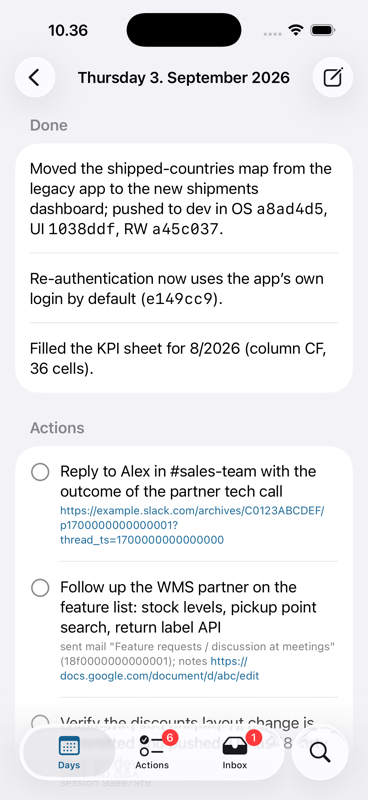
The apps don’t know or care who wrote the file. If your journal follows the format, every app works for you — whether your entries come from my skill, your own version of it, a different AI, or you typing them by hand.
I built the apps with Claude Code too. The first version of the skill and the iOS app went into the repository in one morning. The Mac, Windows and Android apps came later, each in a few hours. The Mac app shares its code with the iOS app; Windows (C#) and Android (Kotlin) are ports that run the same parser tests against the same example files. That is also why I trust the spec: three independent implementations, in three languages, agree on it.
Everything stays local
The journal is private by nature. It contains customer names, figures from meeting notes and excerpts from mail. So the whole thing is built to stay on your machine:
- The entries are files in a folder you choose. Sync them with whatever you already trust — iCloud Drive, Syncthing, OneDrive — or don’t sync at all.
- The apps have no backend, no login and no analytics. They read and write that folder, nothing else.
- The collector runs on your computer and talks only to your own accounts (Google, Slack) with your own credentials.
There is one step that normally leaves the machine: the AI that reads the raw material and writes the entry. With Claude Code, that day’s material goes to the model provider, the same as any other Claude Code session.
If you want to be 100% local, swap that step for a local model. Nothing in the design depends on a particular AI: the collector produces a plain text file, the rules are a plain Markdown file, and the output is a plain Markdown file. Anything that can run a script and write a file can do the job — a coding agent pointed at a model running on your own hardware, or a small script that feeds the raw file and the rules to a local model. The trade-off is quality: the judgment calls (“did I actually answer her?”) are where a big model earns its keep, so test the Actions list before you trust it.
This repo is the simple version — build your own
This is the most important point of this whole article.
The open-source repository is deliberately the simple version. It reads the tools I use: git, Claude Code, Google Workspace and Slack. At OGOship, where I’m CTO, the same skill ships in our internal Claude Code plugin next to our other company skills, and that internal copy is where our company-specific improvements will go. That is how it should be: the skill should match the way your team communicates.
Your day probably lives somewhere else. Outlook and Teams instead of Gmail and Slack. Jira or Linear tickets. Zoom or Teams transcripts instead of Gemini notes. WhatsApp with customers. A CRM. So don’t just install my skill — improve it for your own daily communication tools:
- Fork the repository.
- Open Claude Code in it and describe your tools: “We use Outlook, Teams and Jira. Change the collector to read those instead of Gmail and Slack, and keep the journal format exactly as it is.”
- Keep the format. That’s the only rule. As long as the files follow spec/JOURNAL_FORMAT.md, all four apps, the carry-over, the open-actions list and the search keep working.
A skill is just a Markdown file with instructions and a few scripts. It’s the easiest kind of software there is to change, and the AI that runs it is also the best tool for rewriting it.
What I learned
The value is in the carry-over, not the summary. A nice summary of yesterday is pleasant to read once. An action that shows up again every morning until it’s done is what actually stops me from dropping things.
Every action needs a source. Without the mail id or the Slack link, an action like “follow up with the partner” is useless a week later. With the link, it’s thirty seconds.
Plain files beat a clever system. Because the journal is Markdown, I can grep it, edit it in any editor, diff it, and hand it to any AI. Because the format is a spec, four apps on four platforms could be built against it independently.
Your AI already knows what you did. Your AI sessions, your commits and your messages are a better record of your work than anything you would write down yourself at 6 pm. You just need something that reads them for you.
Try it
The code is open source (MIT) at github.com/pylenius/daily-journal: the Claude Code skill, the format spec, and the apps for iPhone/iPad, Mac, Windows and Android. Mac, Windows and Android have ready-made downloads on the Releases page; the iOS app you build yourself in Xcode.
In Claude Code, two lines install it:
/plugin marketplace add pylenius/daily-journal
/plugin install daily-journal@pylenius
Then tell it where your journal folder is (one line in ~/.config/daily-journal/config.json; the README has an example) and run /daily-journal yesterday tomorrow morning. After that, make it yours — and if you adapt it to Teams, Outlook, Jira or something else, I would love to hear how.