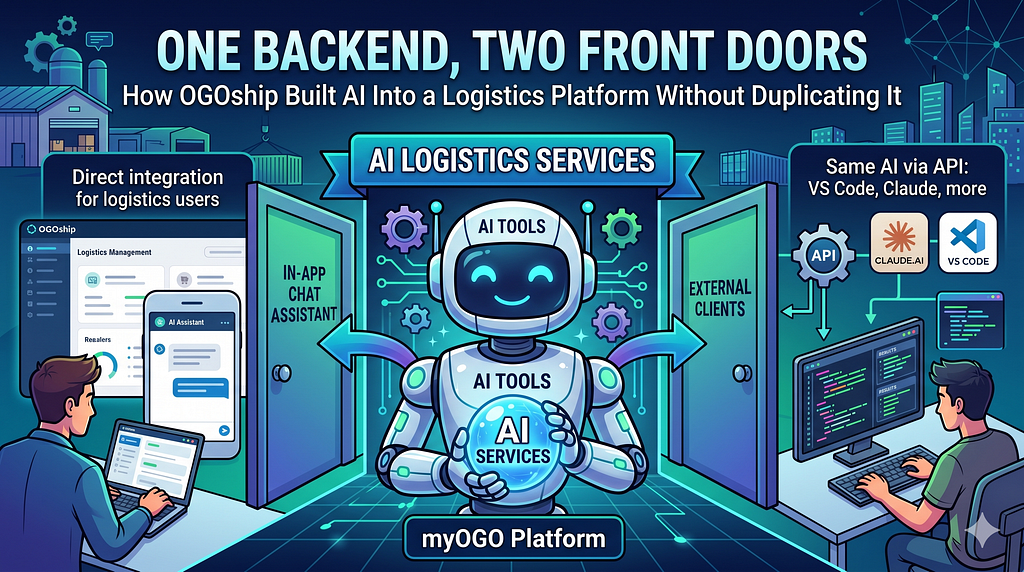
How OGOship’s myOGO platform serves the same AI tools to an in-app chat assistant and to external clients like Claude.ai and VS Code — without writing them twice.
When we set out to add AI to OGOship’s logistics platform, we made one decision early that I think saved us from the most common AI-integration trap: we treated AI as a surface, not a feature.
Most companies bolt a chat widget onto their UI. Then someone realises that developers and power users want to drive the platform from Claude Desktop or VS Code, so they bolt MCP onto the backend separately. Now they have two AI codebases that drift apart: the chat widget calls one set of methods, MCP calls another, and somewhere along the line the order-search behaviour in the chat differs subtly from the order-search behaviour in Claude Desktop. Both have to be tested. Both have to be reasoned about. Each new AI capability has to be implemented twice.
We built it the other way around. One shared tool layer. Two front doors over it. The same search_orders runs from inside our SaaS UI and from a developer's terminal, and you can't tell the difference from the answer it gives.
The two front doors
The first front door is an embedded chat assistant that lives inside the OGOship UI. It knows what page the user is currently on. It can render approval cards inline. It can return Excel files and CSVs when the answer is “here are 200 rows.” It accepts dropped images — a packing slip, a receipt — and reads them with a vision model. It is the co-pilot inside the product.
The second front door is an MCP gateway. MCP — Model Context Protocol — is the open standard for letting AI clients (Claude Desktop, VS Code, Cursor, and others) call into a backend’s tools. We expose the same myOGO platform via MCP with two authentication modes:
- OAuth for online AI clients that can do interactive login.
- API key for IDE and CLI clients where interactive OAuth isn’t practical.
The end result: a merchant admin can ask “how many shipped orders contain product X this week?” inside the app, or from Claude Desktop on their laptop, and get the same answer scoped to the same merchant. The auth differs, the front door differs, the tool that runs is identical.
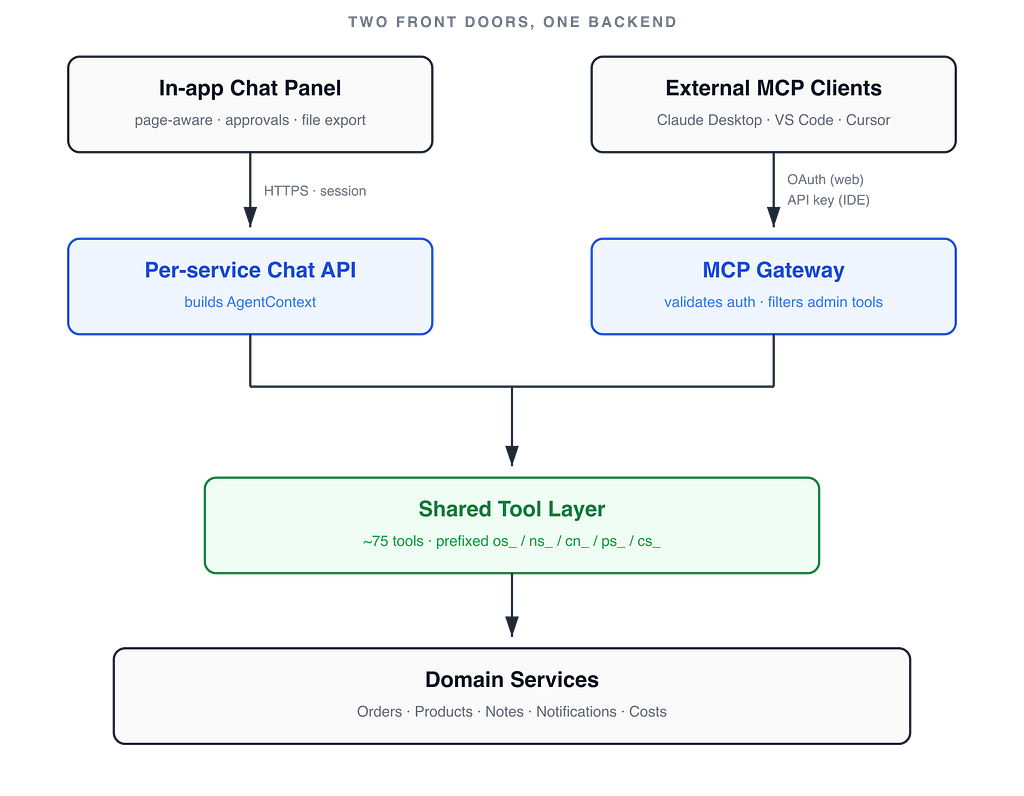
The shared backend underneath
The central insight: tools should be thin wrappers around the business logic you already have.
Adding AI to myOGO didn’t require rewriting the order service, the product service, or any of the others. It required exposing them. Each tool is a small adapter that extracts authentication, calls an existing service method, and returns a result. The business logic — the actual querying, filtering, validation, persistence — is untouched.
Each tool implementation has two binding modes. When called from MCP, it receives a JWT claims principal and pulls the merchant ID and channel ID from the token. When called from the in-app agent, it receives a request-scoped context object and pulls the same identifiers from there. Same business logic underneath; only the auth-extraction differs. We have around 75 tools today across five services — and that count keeps moving as we add more.
A few architectural choices that turned out to matter more than they looked:
Naming convention as architecture. Every tool is prefixed by service: os_search_orders (Order Service), cn_admin_upsert_snippet (Context Notes), ns_search_tickets (Notification Service). The prefix prevents collisions across dozens of tools and dozens of services, and it makes tool names self-documenting. When you see cn_admin_upsert_snippet in a log, you know exactly which service and which permission level it touches.
Admin/user separation, defended twice. Tools whose names contain admin are filtered out of the gateway's tool list for non-admin callers — a regular user literally doesn't see they exist. Then the tool itself does an explicit role check before executing. Defence in depth: a misconfigured client trying to call an admin tool by name still gets rejected at the destination.
Discovery is automatic. New tools appear via reflection. Add a method, the gateway picks it up at startup. No central registry to keep in sync. (This is also a footgun — more on that below.)
What makes the in-app agent useful
The MCP gateway is mechanical: a protocol, an auth check, a tool call, a result. The in-app chat assistant is where we did most of the interesting product work.
Page context, declaratively. Each page in the UI declares: “I’m showing return requests, and here are the help-text codes for this view.” When the user opens chat, that context gets injected into the system prompt automatically. The model knows what’s on screen without the user explaining. “Why isn’t this returnable?” becomes a question the model can actually answer, because it knows what this refers to.
Help text loaded on demand. The page declares help-text codes, not the full content. The model fetches the actual help text only when it’s relevant, via a tool call. Cheap context, expensive content — only paid for when needed. There’s a satisfying second-order effect here: an admin can update the help text by talking to the same AI (“update the help for the orders page to mention the new refund flow”), and from the next message onward the in-app chat agent uses the new copy. The product documents itself.
Image input gives you OCR for free. No separate OCR pipeline. The vision model reads packing slips, receipts, screenshots — whatever the user drops in. The same chat that can search orders can also extract data from a photo of one.
Excel and CSV export. When the answer to “list all late orders this month” is 200 rows, the agent saves a file and hands the user a download link. Wall-of-text answers are an anti-pattern; structured answers belong in spreadsheets.
Counting is its own tool. This sounds trivial; it isn’t. We have search_orders (returns full payloads) and count_orders (returns one number). Models reason better with specialised operations than with one fat tool that has to be told to "just give me the count." Tools are an interface for the model — not for humans — and they should be designed with that in mind.
The trust layer: approvals
The single most important question an engineering leader should ask before greenlighting an AI integration is: what stops it from doing something dumb?
Our answer: read tools execute immediately, but write tools don’t. A write tool returns a pending approval — a structured payload describing what would happen. The UI renders an approval card with a human-readable summary (“Change order 4231 to Express”) and the underlying details. The user clicks Approve or Reject. Only on approval does the change actually apply.
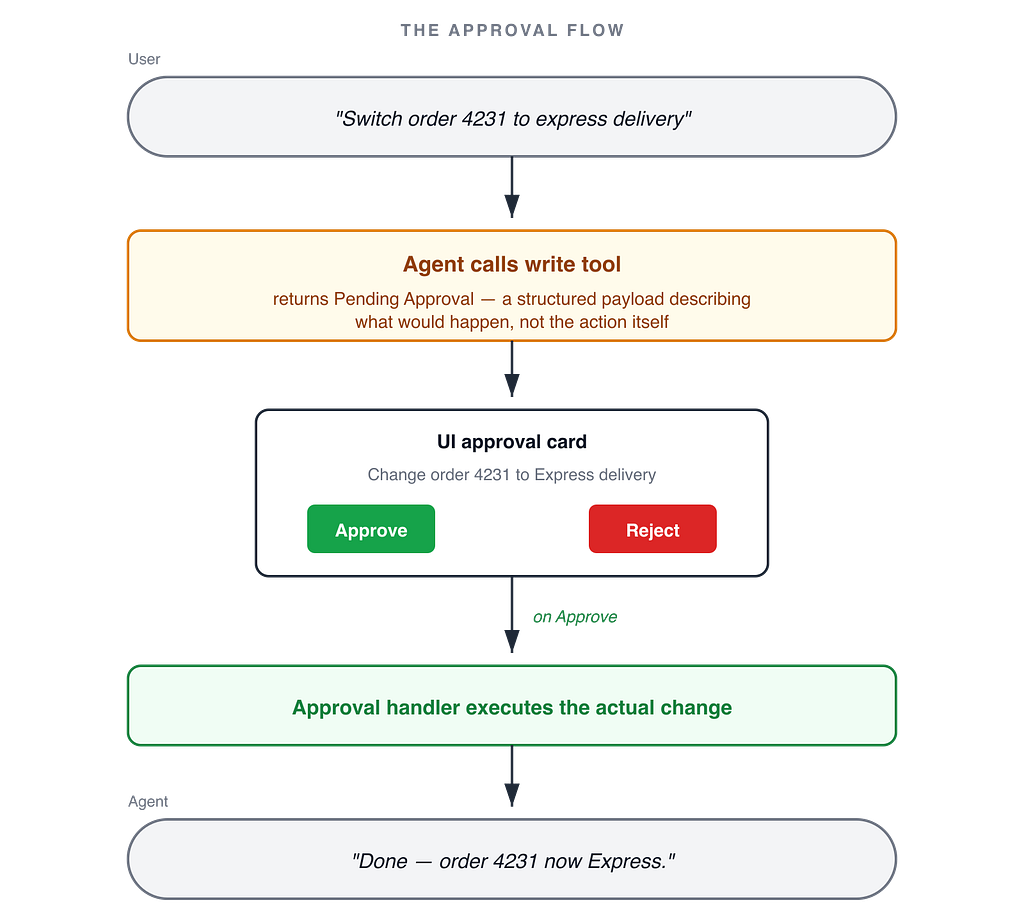
This pattern matters for three reasons:
- AI hallucinations on read paths are recoverable. The user reads the output and decides whether to trust it.
- AI hallucinations on write paths are not recoverable without an approval gate. Every write would otherwise be a small leap of faith.
- The approval gate gives you a defensible audit trail. “AI proposed it, human committed it” is the same compliance posture as a human clicking the button manually. You can show that to a regulator with a straight face.
It also resolves the agent-vs-copilot debate cleanly. The system can be agentic — it can search, count, reason, and draft changes — while still being a copilot at every write boundary. You don’t have to choose one mode and live with the consequences. The cost is one extra round-trip and a UI affordance per write tool. Worth it.
Tradeoffs
Honest accounting:
- Upfront design cost is higher than dropping in an off-the-shelf chat widget. It pays back as you add the second, third, fourth AI surface — but only then.
- Tool naming discipline matters. Without a service_prefix_action convention, 75 tools become unsearchable noise. The convention is the cheapest piece of governance you'll buy.
- Approval flow adds friction on writes. That’s the point on writes; it would be wrong on reads. Get the read/write split right and the friction lands where you want it.
- Reflection-based registration is a footgun. It’s easy to ship a tool you didn’t mean to expose. We mitigate with code review and the admin-keyword convention, but a more explicit registry would be safer. We’ll probably revisit this.
The recommendation
If you’re an engineering leader evaluating how to add AI to your platform, the headline recommendation is short: don’t ship a chat widget. Ship a tool layer, then put a chat widget on top of it.
The chat widget is the work of week one. The tool layer is what compounds. Once the tools exist as first-class entities — discoverable, named, scoped to auth, defended at the gateway and at the tool — adding new AI surfaces becomes additive instead of duplicative. We have two front doors today. We could add a Slack bot tomorrow without rewriting a single tool.
One backend. Two front doors. The same tools serve a chat panel inside our SaaS and Claude Desktop on a developer’s laptop. That’s the architecture that makes sense.